
Product overview
KARNUX VMS
Enterprise Video Management System
KARNUX VMS is video management software for IP cameras and NVRs that brings live view, recording, playback review and device management together in one platform.
It is installed within the organization's own infrastructure and used through a web browser, with tools to monitor system status, manage storage and control access.
On this page
- Core capabilities of KARNUX VMS
- Video management capabilities
- An architecture for the way the organization deploys
- System administration and security
- Explore the KARNUX interface
- Technical overview
- Detailed technical specifications
- Choose the edition for the organization
Core capabilities of KARNUX VMS
The main tools for monitoring, recording and managing a video system.
- Live video monitoring
- Watch live video from many cameras at once, with display layouts arranged for the work at hand.
- Video recording
- Manage video recording, follow recording status and manage storage.
- Playback and export
- Review recorded video on a timeline and export video files for investigation, according to user permissions.
- Camera and device management
- Manage IP cameras and NVR channels, grouped by area.
- System health monitoring
- Follow camera, recording and storage status to check that the system is ready.
- Maps and visualization
- Show camera positions on a geographic map or a site plan, to follow devices more easily.
- Browser-based
- Operators and administrators use KARNUX in a web browser, with no client software to install, in English or Thai.
- On-premises
- Installed on Linux servers administered by the organization; recorded video stays on the organization's own servers.
- Perpetual license
- Every edition is licensed perpetually, not by subscription, and keeps working without Software Update & Support.
Video management capabilities
KARNUX VMS brings video review, device management and system administration together in one platform, so operators and administrators can reach the information and carry out the tasks they need.
Video monitoring and recording
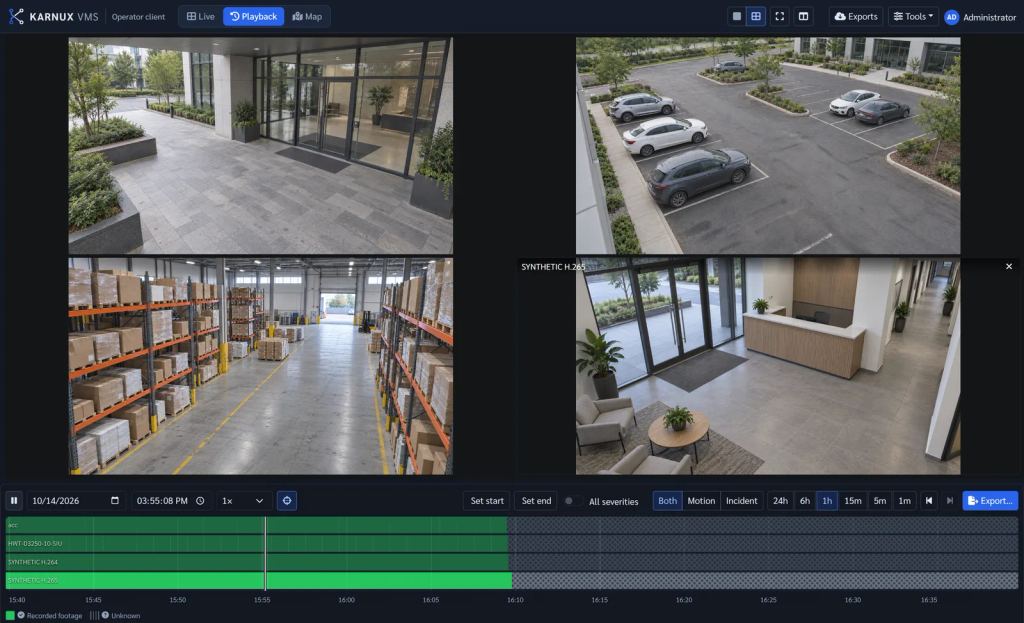 Playback of four cameras on one timeline. [ Larger picture ] JPEG, 101 KB |
From live view to an exported clip, in one workflow.
- Choose cameras and a layout, and keep it as your own view
- Recording runs continuously, or on motion where it is enabled
- Review an event on the timeline, up to 4 cameras in sync (KARNUX Free: 2 at a time)
- Export the period you need as MP4, according to your permissions
Device management
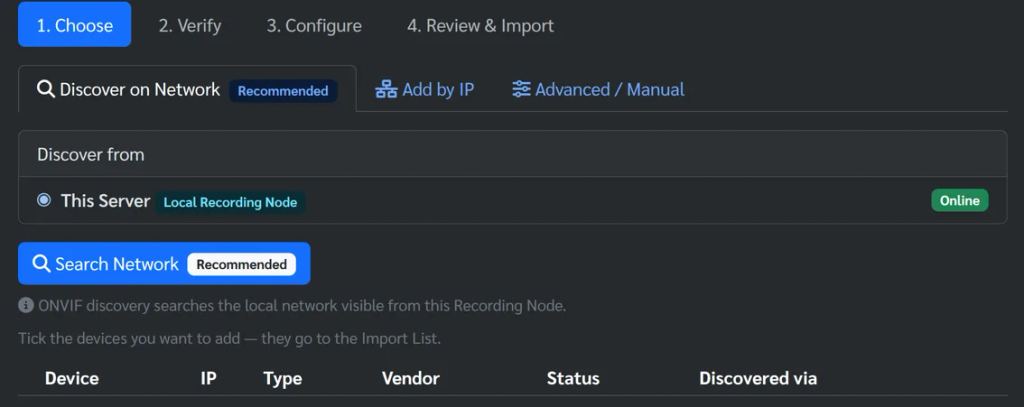 Adding cameras with ONVIF discovery. [ Larger picture ] JPEG, 30 KB |
Bring cameras and NVRs into the system step by step.
- Discover cameras and NVRs on the network, or enter an RTSP address manually
- Verify each device and import it; duplicates are detected
- Group cameras by area
- Place cameras on a GIS map or 2D E-Map (3D Map in KARNUX Professional)
System status monitoring
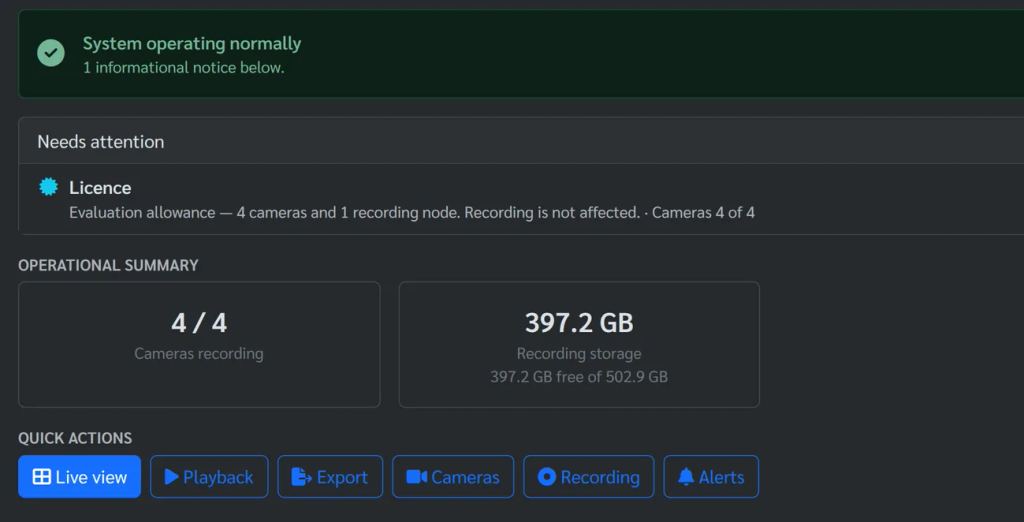 System health and recording status. [ Larger picture ] JPEG, 34 KB |
Follow the readiness of the system and what needs attention.
- Check camera, recording and storage status on the home dashboard
- Review the attention list and acknowledge incidents
- Receive alerts by Telegram or webhook (webhook not available in KARNUX Free)
- Look back at camera, coverage and storage history in reports
Alerts and health reports are enabled during deployment.
Administration and access control
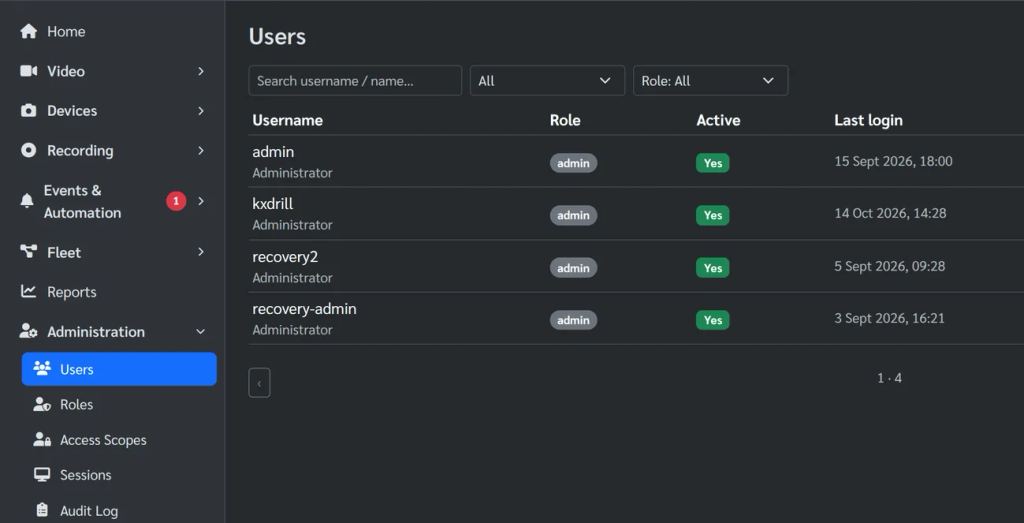 Users and access management. [ Larger picture ] JPEG, 35 KB |
Give each person the access their role needs.
- Create users and assign roles and permissions
- Limit a user to selected areas or cameras where needed
- Review active sessions and revoke them
- Trace user actions in the audit log
An architecture for the way the organization deploys
KARNUX VMS supports different deployments according to the size and requirements of the system, from a single server to central management with multiple Recording Nodes within one site.
Single server deployment
Camera management, recording and video delivery on one server, for systems that need a simple installation and maintenance structure.
Supported in KARNUX Free, Standalone and Professional
| |
 | |
| |
| |
|
Distributed recording within one site
Central management with multiple Recording Nodes. Video is stored on the server responsible for the recording, so the workload can be spread according to the system design.
For KARNUX Professional: up to 2-10 Recording Nodes, according to the licensed camera count, managed centrally within one site.
|
| ||||||
| | ||||||
|
|  |
| ||||
| |  | |||||
||
Diagram key: Video | Management and configuration
System administration and security
KARNUX VMS provides tools to administer the system and control access, supporting the operation, review and maintenance of the video system within the organization.
- Role-based access control
- Assign permissions by the role and duties of each user.
- Audit logging
- Record the relevant actions, to support later review.
- Session management
- Review and manage user sessions.
- Storage management
- Set storage policies and video retention periods.
- Event monitoring
- Follow events and alerts related to system status.
- Advanced Automation
- Define rules that respond to events, and automated actions.
Explore the KARNUX interface
Screens from KARNUX VMS showing the tools for video review, device management and system status in a web browser.
The full operator client in Live View: cameras in a 2x2 layout, with the view tabs and the layout panel. |
Camera positions and status on a geographic map, opening live view or playback from a marker. | ||
Cameras placed on a floor plan or site plan, in every edition. |
Cameras in a 3D building model, floor by floor. KARNUX Professional only. | ||
Open incidents with their severity and status, for review and acknowledgement. |
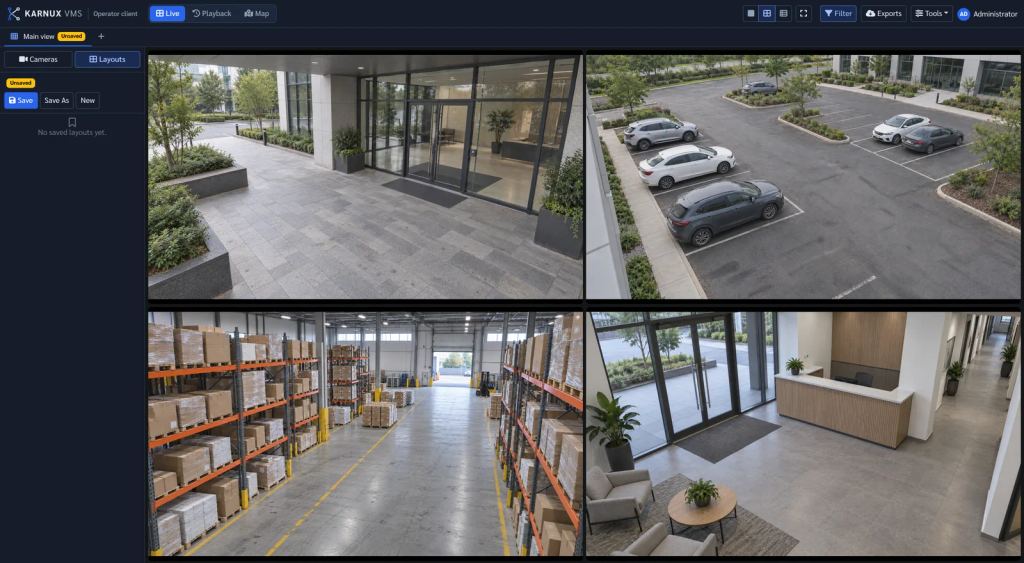
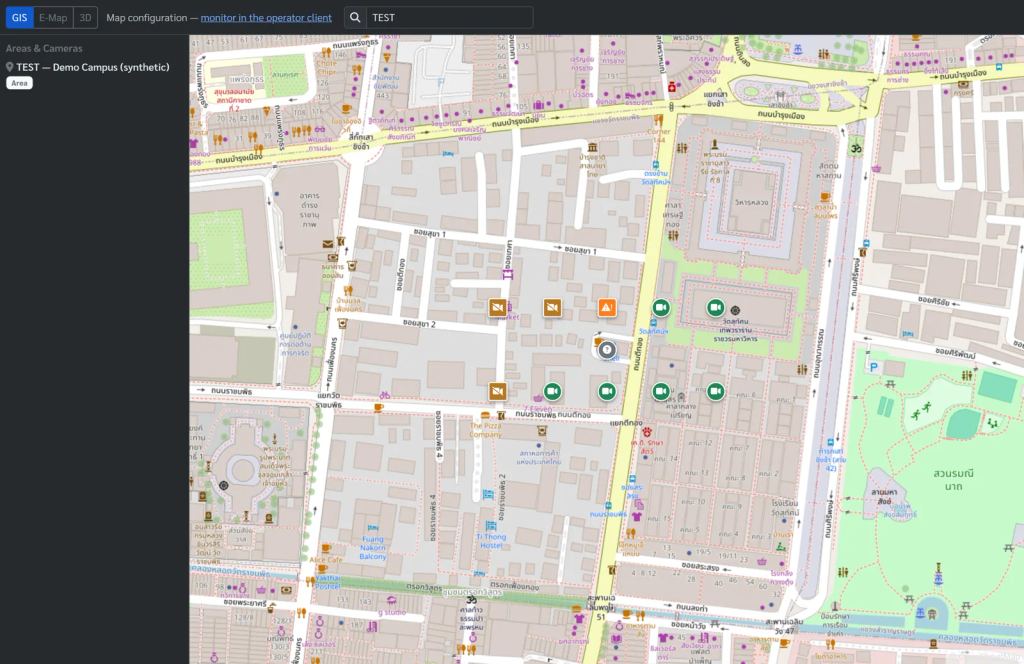
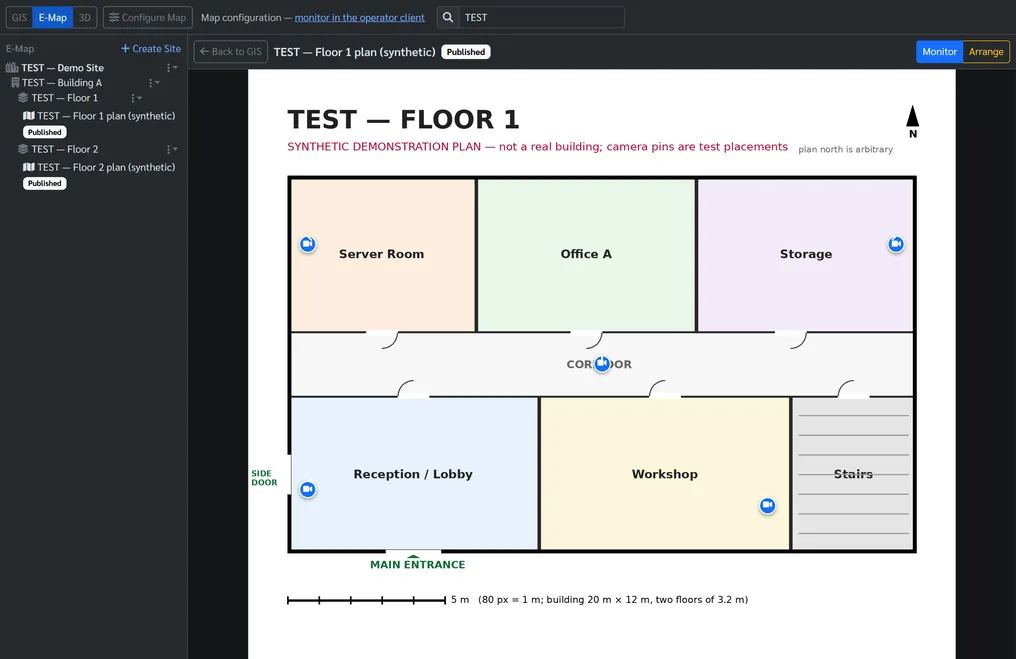
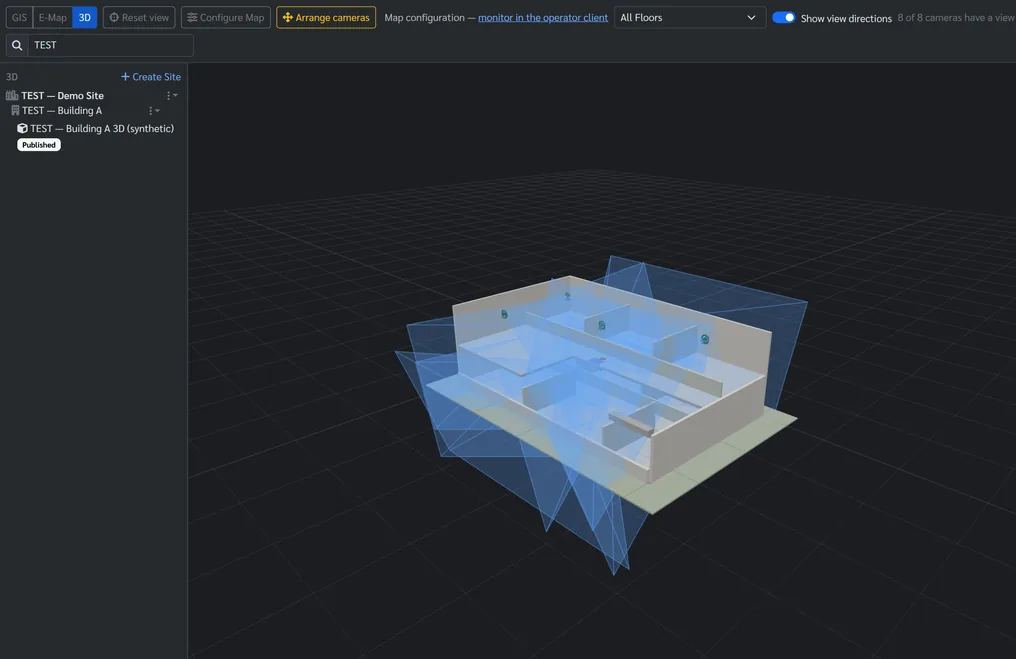
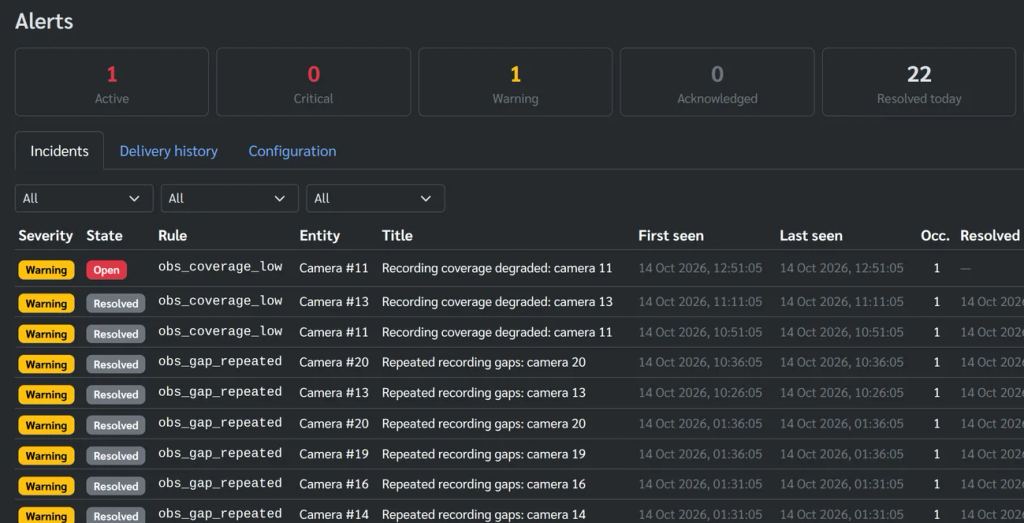
Camera positions and status shown on a map are a guide and may not be exact.
Technical overview
Basic information for system administrators, developers and installers, to assess how KARNUX VMS fits the organization's infrastructure.
| Topic | Details |
|---|---|
| Operating system | Ubuntu 24.04 LTS (amd64) |
| Deployment | On-premises, on Linux servers administered by the organization |
| User interface | Web-based interface |
| Languages | English and Thai |
| Video sources | IP cameras and NVR channels over RTSP |
| Recording storage | On the server responsible for the recording |
| Access control | Role-based access control |
| Architecture | A single server, or multiple Recording Nodes within one site |
| Licensing | Perpetual license |
Detailed technical specifications
Functions available in the current software, by area. Functions that are enabled during deployment, or licensed only with KARNUX Professional, are noted under their name.
Live view, recording and review
| Function | Details |
|---|---|
| Live Monitoring | View live video from multiple cameras in a web browser, in single, 2x2 or custom layouts. Saved operator layouts, camera filters and per-tile recovery keep a monitoring view organized. H.264 plays directly; display of H.265/HEVC in Live View depends on the browser, the computer's hardware and the system compatibility settings.
|
| Recording | Record assigned cameras continuously on the server responsible for them. Motion-based recording can be enabled when required. Segmented recording includes worker recovery and reconnect handling, and tracks recording coverage for each camera. Coverage indications support monitoring and can under-report what was recorded, so check Playback before concluding footage is missing. Motion recording is optional: an administrator enables it, and it uses frame-difference motion detection.
|
| Playback | Review recorded video on a timeline, with up to 4 cameras in synchronized playback. Protected playback sessions are built from indexed KARNUX recordings, with a timeline that marks where recordings exist. Up to 4 cameras play back in sync (2 at a time in KARNUX Free). Display of H.265/HEVC in Playback depends on the browser, the computer's hardware and the system compatibility settings.
|
| Video Export | Export recorded video as MP4 files for investigation and handover. Export runs as a managed job with visible progress, cancellation and protected download. Export copies whole recorded segments, so a clip can include footage before or after the selected interval and can be longer than requested. Check a clip before sharing it.
|
Devices and maps
| Function | Details |
|---|---|
| Device Onboarding | Discover and add IP cameras and NVR channels, and organize cameras by area. The Add Devices workflow moves from discovery to credential verification, configuration and review before import, so onboarding does not require RTSP or ONVIF expertise.
|
| Map Operations | Show camera locations on a GIS map or a floor plan and open Live View or Playback from the map. Camera markers on a GIS map or a 2D E-Map floor plan, with clustering and status filters, open Live or Playback for that camera. GIS map and 2D E-Map are part of every edition; 3D Map is part of KARNUX Professional. Camera positions and status shown on a map can be inaccurate.
|
| 3D Map KARNUX Professional only | Show cameras in a 3D model of the building, floor by floor, with estimated viewing areas. Upload a 3D building model, place cameras in it and move between floors, with camera markers and view-direction indicators. 3D Map is part of KARNUX Professional.
|
Monitoring and storage
| Function | Details |
|---|---|
| Operational Alerts Requires configuration | Raise alerts for camera, recording and storage conditions, and review incidents. Detection covers recording workers, coverage gaps, camera availability, disk pressure, retention, backups and time sync. Alerts can be delivered to Telegram or a webhook once configured; webhook delivery is not available in KARNUX Free.
|
| System Health & Reports Requires configuration | Monitor camera, recording and storage status from one dashboard, with reports on system activity. Recording systems keep local history for camera availability, recording coverage, exports and storage trend. Central management adds fleet summaries with alert and audit reporting. Health indications support monitoring and can under-report recording coverage, so check Playback before concluding footage is missing.
|
| Storage & Retention | Manage recording storage and set how long recordings are kept, by time or available space. Volume lifecycle, capacity planning, health checks and reviewed reclaim plans keep storage state visible and under operator control. KARNUX Free uses one recording storage volume.
|
Administration and automation
| Function | Details |
|---|---|
| Users, Roles & Audit | Manage users, roles and access permissions, with an audit log of activity. Role-based permissions, session control and audit records are built in. Area and camera access scopes follow an explicit staged rollout.
|
| Advanced Automation KARNUX Professional only | Rules-based triggers and actions that respond to camera, recording, storage, alert and system events. Rules can open or resolve incidents, send notifications, annotate, create operator tasks and control recording. Creating or activating rules requires KARNUX Professional.
|
Choose the edition for the organization
KARNUX VMS comes in editions for different uses. Capabilities and limits depend on the license chosen.
KARNUX Free
| |||||
 | |||||
|
|
| |||
Up to 24 cameras. To start using video management software with no software license fee, within the capabilities of the Free edition.
KARNUX Standalone
| |||||||||||
| |||||||||||
|
|
|
|
|
| ||||||
Up to 64 cameras. For organizations that install and manage a video system on a single server, with more capabilities than the Free edition.
KARNUX Professional
| |||||||||||
| |||||||||||
|
|
| |||||||||
| | | |||||||||
|
|
|
|
|
| ||||||
Up to 480 cameras. For organizations that manage a video system with multiple Recording Nodes within one site, with additional management and automation capabilities.
[ Compare editions ]
About the screenshots. Some illustrations use simulated camera imagery to demonstrate the display within the actual KARNUX VMS interface. Sample images and data are not evidence of system test results.