Integrations

Works with the cameras and NVRs you already have.

Karnux records RTSP video from IP cameras and NVR channels, onboards supported devices through a guided workflow, and can deliver operational alerts to the tools your team uses.

How devices connect

Video in. Operator context out.

Cameras and NVR channels supply the video. Karnux records it, serves it to the browser, and turns its own operating signals into alerts you can route outward.

Sources
IP cameras / NVRsRTSP · ONVIF
System signalsRecording · storage · health
Video managementKarnux
Operator context
Live & reviewVideo workflows
Alerts & stateOptional outbound delivery

Catalogue

Everything listed here is implemented in the product.

Device onboarding paths and delivery channels. Nothing is listed on the strength of a vendor name alone.

Camera and NVR onboarding

Implemented device paths used to bring cameras and NVR channels into Karnux. Confirm behavior on the exact model and firmware you plan to deploy.

ONVIF

Discovery & onboarding

Find supported devices on the network, inspect their profiles and import the camera streams or NVR channels you select.

Network search only reaches the network the searching system can see. Devices elsewhere are added by IP. ONVIF event streams are not supported.
Hikvision

Vendor device path

Onboard Hikvision cameras and NVR channels through an implemented vendor inspection path.

Dahua

Vendor device path

Onboard Dahua cameras and NVR channels through an implemented vendor inspection path.

Channel enumeration is best-effort, and some models need the channel count entered manually.

Media and delivery standards

The protocols Karnux uses to carry video into the system, deliver it to the browser and send configured alert notifications outward.

RTSP

Video source

Bring camera and NVR-channel RTSP streams into Karnux live viewing and recording.

Compatible H.264 is required for current browser live view. H.265 recording and export are supported; recorded H.265 playback depends on client codec support.

HLS

Browser video

Deliver authenticated live and recorded video to the Karnux browser interface.

In a distributed deployment, browsers need trusted HTTPS access to the node that owns the video.

Webhook

Alert delivery

Send configured operational alert notifications outward to a generic webhook endpoint.

Outbound only, and off until an administrator configures and tests it.

Telegram

Alert delivery

Deliver configured operational alert notifications through Telegram.

Vendor names identify implemented device paths, not certification or partnership. Compatibility varies by device model and firmware, so validate the target equipment before deployment.

Adding devices

From unknown device to recording camera in four steps.

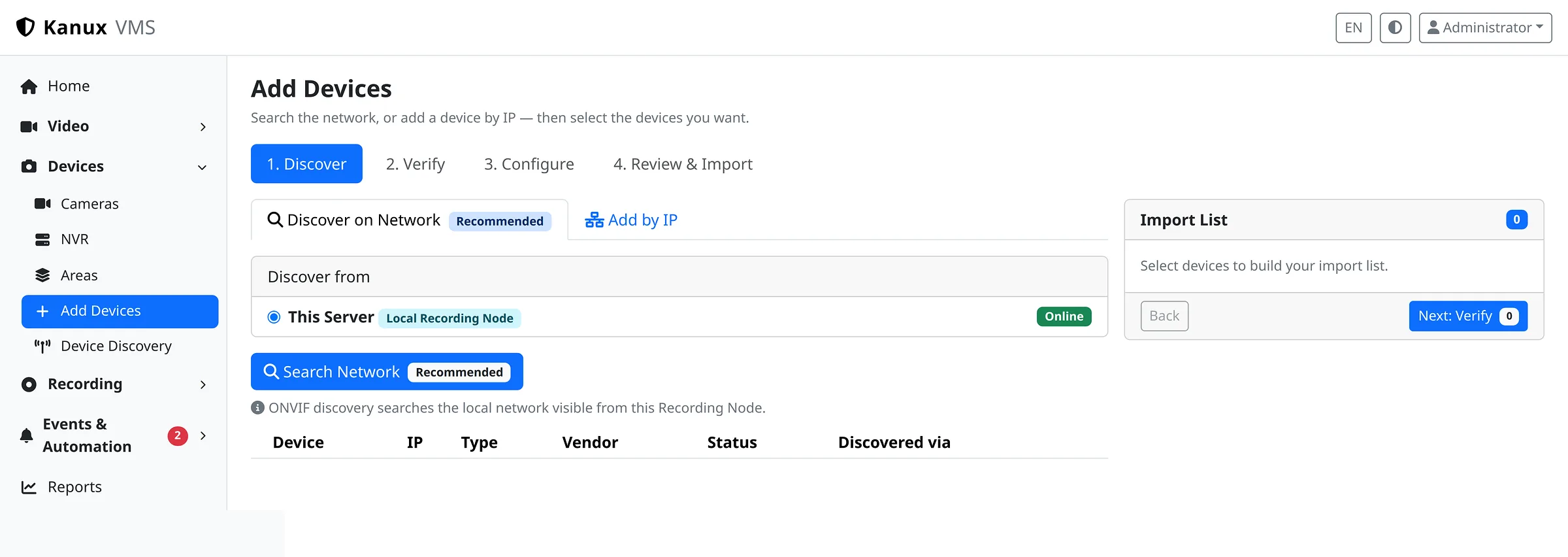
The Add Devices workflow handles discovery, credentials, configuration and import. Onboarding does not depend on knowing RTSP paths or ONVIF internals.

The Karnux Add Devices workflow at the discover step, showing the four stages, the recording node to search from, and network or add-by-IP options.
Guided onboarding: discover, verify, configure, review and import.
  1. 01
    Discover

    Search the network for supported devices, or add a specific address. No credentials at this stage.

  2. 02
    Verify

    Send the credentials you enter to the selected devices and get a clear result for each one.

  3. 03
    Configure

    Set the name, area, recording system and policy, and choose which NVR channels to bring in.

  4. 04
    Review & import

    Confirm the final list, then import. Re-running an import never creates duplicates.

Compatibility

Bring the exact devices and workflows.

Share model, firmware, codec and expected behavior where you can. We will define what should be validated for your environment.